Showing posts with label Social Media. Show all posts

Thursday, 6 March 2014

How this Famous Oscar Photobomb Defines Twitter for Marketers


Ellen's famous Oscar selfie

Last Sunday, Oscar host Ellen Degeneres broke Twitter with the most epic of all selfies. The picture was retweeted more than 1.3 million times in less than an hour, breaking President Obama’s 2012 victory photo which had 780,000 retweets. The star-studded photo included famous actors like Brad Pitt, Angelina Jolie, Meryl Streep, Julia Roberts, Jennifer Lawrence, (half of) Jared Leto, Channing Tatum, Kevin Spacey, Lupita Nyong'o and surprisingly, Lupita Nyong'o’s non-celebrity brother, Peter. The media was ablaze shortly, calling attention to Peter’s photobomb. What Peter did in this opportunistic moment happens thousands of time each day on Twitter, as the “normals” interact directly and in conversation with the celebrities of their field. That’s the power of Twitter and marketers can take a lesson.

The Shared Experience

Ellen’s tweet created a shared experience with millions of people around the world. Like Peter, we felt we were participating in history because we were doing this together, even if most of us have never met one another, let alone Brad Pitt. Famed media analyst, Brian Solis spoke about the phenomenon of the shared experience in an early 2013 interview:
“Shared experiences form an influence loop that is connected to each moment of truth. It’s what people find that guides them. It takes more than Google now. People are talking and connecting. Experiences are shared in tweets, posts, videos and reviews. You’ve optimized search, your website, your mobile app, but you haven’t optimized for shared experiences. Shared experiences affect customer impressions and next steps in each moment of truth. Shift from impressions to expressions.”
Do Us a Flavor

Marketers can leverage this concept by creating opportunities for fans from around the world to participate together. For example, recently Lay’s Potato Chips crowd-sourced a Do Us a Flavor, contest to determine the next flavor of Lay’s Chips. Nearly 3.8 million submissions were created in 2013 and more than a million votes were cast to select Cheesy Garlic Bread as the winner. This not only engaged millions of Lay’s fans together, it also generated hundreds of marketable assets and press (and one tasty bag of chips).

ShareBloc recently attempted a similar tactic, creating a contest to determine the Top 50 Content Marketing Posts of 2013. In our first two weeks of our company’s launch, we saw more than 600 people vote more than 7,000 times to determine the winner. We’re planning a similar contest in March for the Marketo The Marketing Nation Summit so go to www.sharebloc.com/contest on March 11 for more information. The winner of the contest will get a FREE ticket to The Marketing Nation Summit on April 7-9.

Ask Your Audience to Share

When Ellen boldly asked the audience for her tweet to break the retweet record, fans around the world complied. Ellen asked people to share so we did. Hubspot’s social media scientist, Dan Zarrella, studied 2.7 million tweets and found asking your followers seven simple but powerful call-to-actions on Twitter materially increased the reweet-per-follower ratio. Asking your followers to “please help” was by far the most effective, showing a 160% increase from the average. Famed marketer Jeff Bullas suggests three additional calls to action in addition to a retweet: Ask for a download, Ask for a follow and Ask for a reply.

Retweets-per-follower by call-to-action from HubSpot

We employ a similar strategy at ShareBloc. We tweet twice a day the top posts from @ShareBloc, most of which are the best posts on social media, content marketing, SEO and technology. This garners dozens of favorites and retweets from different accounts each week, most of whom we suspect are automated. We track to see if any new accounts engage with us on Twitter and ask them to join ShareBloc with calls to action like “don’t forget to join” or “check out ShareBloc”. So far, the engagement percentage is encouraging with more than 10% of our conversations clicking through the link.

We are all Peter Nyong'o Now

When Peter Nyong'o photobombed Ellen’s selfie, it was not dissimilar from when fans insert themselves into a conversation between two known celebrities. For example, Arby’s famously tweeted at musician Pharrell Williams during the Grammys about his now infamous mountain hat. Thousands engaged with the celebrity and fast food franchise.

Arbys and Pharrell Williams

Twitter is also the ideal medium for reaching directly to your user base. While some personalities have gotten in trouble with this type of outreach, often times it can create engagement and new marketing assets. For example, Taco Bell’s twitter account is famous for its fun attitude and timely retweets. They’ve recently run a campaign for their breakfast menu with the hashtag #TacoBellBreakfast and have gotten even celebrities like Ashton Kutcher to participate.
At ShareBloc, we encourage a dialogue with our users on Twitter. Oftentimes, we’ll tweet at the author or the person who posted a top content post to let me know they’re reaching our Twitter following (not a lot for now) and our registered users (a lot more). Here’s a recent example of our interaction with SEO expert, Brian Dean of Backlinko.

@Backlinko @ShareBloc Twitter discussion


If you’d like to insert yourself into Ellen’s selfie, here’s a website that lets you do that. Also, don’t forget to check out www.sharebloc.com/contest on March 11 for more information. The winner of the contest will get a FREE ticket to The Marketing Nation Summit on April 7-9.

Friday, 7 February 2014

Social Media News: Zuckerberg and Hennessy discuss how social media can solve global challenges

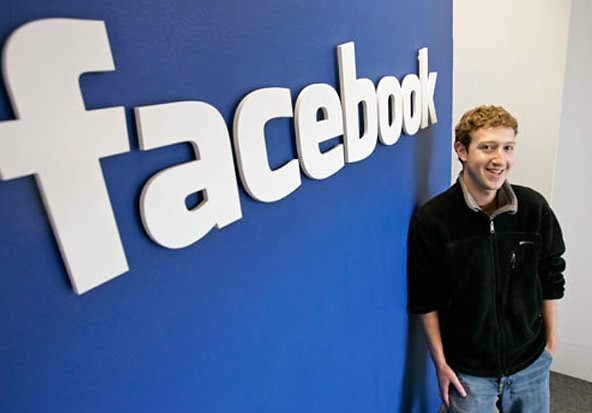
Founder and CEO of Facebook and Stanford student, Mark Zuckerberg sat down the other day with Stanford President John Hennessy to discuss what social media can do for the world. Zuckerberg’s idea behind Facebook was to create a safe environment for people to talk and discuss their plans and ideas at Stanford University, where he was studying at the time. Zuckerberg had assumed that one day one of the “larger companies” would create a website where the whole world could communicate with one another in a safe environment. He never thought that so called company could be him and his fellow colleagues. Zuckerberg even said in his discussion with Hennessy, "I kind of just assumed that one of [the big companies] would build this, and one of the surprises 10 years later is that it actually was us”. There was no real reason why it could not be them, it just was not a concept they had anticipated on.


                                                                                          SOCIALisBETTER- flickr


During the discussion with Hennessy in the jam packed Memorial Auditorium, Zuckerberg discussed his experience during this Facebook project, his career suggestions and tips and even his “philanthropic observations”. During this discussion Zuckerberg stated just where his idea for creating Facebook came from. He talked about what they noticed when trying to communicate online then. He shared that when someone wanted to have a conversation online, the only way to do so was either through small private message groups such as emails or sharing the thoughts through a widely pubic space such as a blog or a chat room. It was one or the other, there was no in between and sometimes the in between would have been nice to have. Those who wanted to share their ideas were not given the opportunity to do so in a way that would make them feel confident in their ideas getting out.

"I think the fundamental idea that Facebook brought was creating this private space that didn't exist before, and by unlocking and opening that space, there's a huge potential to allow people to communicate their ideas," Zuckerberg said.

Essentially what that means is that Facebook opened up many more possibilities and ways of getting your ideas out there. Facebook allows you the option of posting to your page for everyone to see while at the same time, it also supplies the options of you being able to limit who can see your post to a select few or block whoever you don’t want to see your work. However, that being said, Zuckerberg recently pointed out how Facebook is not reaching as many people as he had originally hoped for. Only one third of the global population has access to the internet, so many people still are not able to get their ideas out there for the world to see.

During the discussion, Zuckerberg stated to the people in the auditorium that, "We are robbed of an opportunity to benefit from the innovation that all those folks who are not connected can bring, I want Facebook, and other social apps, to do more than share the moments of day-to-day, but to really have utility and solve big challenges."

This idea in Zuckerberg’s head is what drives his main ambition; to create a way to give everyone in the world access to the internet. Zuckerberg hopes to also create a way to give people access to health care systems and other internet based research tools through Facebook’s internet.org initiative.

Zuckerberg also has some ambition that revolves around his philanthropic work. Zuckerberg hopes to establish a new found appreciation for the fundamental work done in life sciences. He plans to do so through his in depth funding of the Breakthrough Prize in Life Sciences. Zuckerberg claims that “Science is a market failure in that area, the people making fundamental things in science often won't make enough money with the things that they do, and in many cases won't be able to support the work that they do." This is a very valid and often underappreciated point.

Zuckerberg hopes to do whatever it is that he can do to help make these problems known to the public so that they can be addressed and worked on. This is a lesson Zuckerberg learned while in college, “picking the problem to go solve is sometimes more of a challenge than solving the problem," he said. "A lot of time, it's knowing where the interesting intersections are."

Most of Zuckerberg’s ideas and contributions are able to be put into motion due to the incredible success of Facebook in today’s society. So many people ask for Zuckerberg’s advice because of this success so during this discussion in front of many future scientists and engineers of the sorts, he gave a bit of career advice.


His greatest piece of advice was that if you think you would like to start a business, make sure you know what you want to do. Always make sure you are choosing something that you are excited about and have a passion for or else all you will be doing is work. Find something you can do that will make working exciting for you. You’ll be able to create stronger steps and have a greater knowledge of what it is you need to do in order to succeed because you have the passion to do whatever it takes.

This is what he thinks about finding solutions for existing problems. "You want to look at real problems that people have, and those are often the ones that you have yourself, which you have the most real empathy for, pick problems that are real, and apply technology to that."

Zuckerberg also make it clear that you should develop a thick skin. Be prepared to fail a few times before hitting your mark because without failure there is no pride in your success. No complicated project is going to come easy so do not stress yourself out, take your time, do it right and go for it.

Zuckerberg is a great role model with wonderful ambitions. Take his advice and you never know what you may accomplish.

Tuesday, 21 January 2014

Your Content isn’t Going Viral Because it Sucks

It’s the million dollar question every marketer wants to know. How do I get my content to go viral? Who Is Hosting This put out a helpful infographic that helps marketers check their content against their defined formula for success. The infographic does a good job of providing some basic guidelines, however it sparked a whole different line of thought in my brain.


Your Content Sucks

Instead of measuring the success of your content based upon its virality, start measuring content based on the quality of what you put out. It’s like a broken record we’ve been hearing scratching in our ears for too long, but it is so true. The majority of content that is put out from brands is so self-serving and boring that there is absolutely no reason anyone would want to share it. Try to start with making your content about serving the needs, wants, and desires of your audience instead of about the brand and you’ll do much better than you are today. It may not go viral, but you’ll be one step closer. Seriously, if you think that boring video talking about all of your products is going viral it’s time for an intervention. Get creative. Your customers don’t care about your products.

You Can’t Design Content to Go Viral, But You Can Design it to Be Great

If you think that following any formula for virality is going to work, you are setting yourself up for failure. This infographic gives you a lot of tips on how to make content much better, but it isn’t going to be a guarantee of virality. Think of going viral as a free upgrade to first class, not the destination. Design your content to be compelling first. It is near impossible to predict which chords you will strike until they’ve actually been struck. You can try, but realize that a very minute percentage of content ever goes viral. There is a lot of amazing content out there that never achieves virality, but that doesn’t mean it didn’t work. On the flipside there is a lot of content that goes viral that is a complete surprise to those who created it. Recognize that sometimes we don’t know if something is going to work until we are looking at it through the rear-view mirror.

Stop Blowing Smoke and Start With Holy Smokes

I believe one of the reasons there is so much sub-par content out there is because we don’t start with the intended emotion in mind. At SME Digital, we use the Holy Smokes test that Jason Falls created as a starting point for any content that is developed. Before the piece is written, we must define the Holy Smokes factor, which is filling in the blank in the statement “Holy Smokes! That’s _____!” We think about what we want the audience to say after they read or see the content and then we create the content to elicit that emotion. At the end, we check and see if it was able to deliver. If it wasn’t we fix it. Perhaps this will help you start to create your content with the emotional response in mind.
Here are some examples of Holy Smokes factors we’ve used:
  • Holy Smokes! That’s Hilarious!
  • Holy Smokes! That’s Incredibly Useful!
  • Holy Smokes! That’s Amazing!
  • Holy Smokes! That’s Shocking!
  • Holy Smokes! That’s Mind Blowing!
  • Holy Smokes! That’s Smart!
  • Holy Smokes! That’s Exactly What I Needed!
At the end of the day if you create a great piece of content that your audience responds to, is it a win? I say yes. If it goes viral that’s even better.
Take a look at the infographic to see the tips. Do you agree? Disagree? How important is virality in the grand scheme of content? How do you make sure your content is stellar? Leave a comment and join the discussion. 
Who Is Hosting this

Tuesday, 14 January 2014

Social Media and Security: Protecting Your Nonprofit

Social media has revolutionized the way people communicate and has become a central player in the nonprofit field. With the help of social media, nonprofits can easily organize events, raise money and find new supporters, all with just a few clicks.


Unfortunately, like anything else that carries power, social media also carries inherent risk. Just as you can easily improve your nonprofit’s reputation with a few clicks, you can just as easily damage it.


Here are a few ways you can operate safely on social media, while still using it to help your nonprofit thrive:
Be careful about who has access. Do not allow every employee or volunteer to access your organization’s social media accounts. A well-meaning intern, for instance, could inadvertently cause damage with a careless tweet or Facebook post. Even posts that are not malicious could still tarnish your organization’s reputation. For example, a Facebook post that contains poor spelling and grammar might convey that your organization is careless or neglectful.
Create strong passwords. Creating strong passwords is an important and easy way to drastically improve your organization’s cyber security. It is a good idea to create a different password for each of your nonprofit’s social media accounts. This way, if a hacker gains access to one of your passwords, he or she will not then be able to wreak havoc on all of your accounts.
Do not post updates that could compromise physical security. Believe it or not, your social media posts could potentially compromise your organization’s physical security. If your nonprofit operates within four walls, you may want to use discretion when choosing to disclose its location. You should also be careful about publicly posting what equipment and resources are available in your office. For instance, if your nonprofit has just received a generous donation of expensive equipment, such as a number of laptops, it may not be smart to tweet this information for the entire world (including potential burglars) to read.
Require approval for posts before they are made visible. Many social media sites will allow you to approve posts, comments or pictures before they are visible on your organization’s page. Because you cannot control what other people might post on your Facebook wall, for example, it is a good idea to opt for this approval setting. An inappropriate post on your organization’s page can still hurt your reputation, even if it was not posted by someone associated with your nonprofit. (Facebook also gives you the option of reviewing tags.) This security setting will also give you the chance to reject spam links or even links to viruses. If a supporter detects that your page is unsafe or littered with spam, he or she is not likely to visit again.

Thursday, 9 January 2014

2014: The Year Social Media Hits Puberty


ImageIt's nothing short of amazing how businesses have expanded, new industries have been created, and cottage industries have become multi-million (or billion) dollar integrations into the larger Borg-like entities of Google, Yahoo, and the like under the banner of social media. What makes it amazing is the fact that the segment is still defining itself, even as it grows beyond niche networking into an all-encompassing, integral piece of digital life. And it's just out of its diapers.
It's been both wonderful and frustrating to watch the evolution from the first implementation of MySpace to the current space of Facebook, Twitter, LinkedIn, Pinterest, and Google+, just to name the biggies. But in the last year or so things have started to gel, to coalesce, to become more integrated. Instagram  and Pinterest gave way to picture sharing being integrated on every network. Then came Vine, and video sharing spread. Hashtags made the jump from Twitter to the socialverse at large. And then there's SnapChat, a whole new can of worms.
There's momentum now. The floundering is all but over, and the future will come quickly. So what can we look forward to in 2014? How should I know? I'm no psychic. I can make some educated guesses though, based on the trends and progressions of the past year (and insight from some thought leaders - hey, we all need input).

Facebook Will Slow Down

It's not rocket science, just normal business cycles and generational differences. Facebook has been on top of the social scene for years, but they're becoming mom and dad's social network. A recent article mentioned that in Europe teens won't even admit to having a Facebook profile, it's so uncool. Facebook surely will remain a top player, but watch for major growth from other sites to give competition in numbers. As a business, that means you can't keep clinging to Facebook as you only online presence. Time to branch out.
On the flip side, Twitter will grow this year. In the wake of a successful IPO and with revenues now urgent for shareholders' sake, look for new opportunities on the site.

Images and Videos Will Dominate

No, I didn't steal that headline from last year's article. I realize that pictures and videos are already the hottest thing on the web, but this year they won't lose any steam. The question is, will sites that are image-centric (Tumblr, Path, SlideShare) continue to grow, or will their functionality become obsolete as the Facebooks and Twitters of the web integrate images more and in new ways? If you haven't leveraged Vine or Instagram for video promotions in your company, this is the time to do it.

SnapChat will Shake Things Up

SnapChat may have inadvertently started a revolution this year. Even if the company were to go belly-up today, their model is one that is already sending reverberations of fear and hope throughout the internet. In the face of the most intrusive breach of personal privacy ever known in our country, if not the world (the NSA scandal, of course), SnapChat created the unthinkable, at least to a digital marketer: an erasable internet.
Unless they get squashed before the general public knows what they are and embraces the idea, it could spread like a virus in 2014. A good virus for you as a person, a deadly one for marketing a business online. Imagine no data to crunch in determining who does what online. Shooting in the dark, to put it mildly. Watch this development closely, because regardless of how it shakes out, I predict a big change coming in this area.

Finally, Google+

I've been saying it for at least two years, but this will be the year that Google+ goes mainstream. They've already quietly climbed to the number two spot behind Facebook for number of users, and they stand to gain from Facebook's likely losses this year. If you haven't read my reasonings for G+ domination before, here's the nutshell version.
G+ is simply an arm of Google search, which is the central piece of a gigantic empire. Google Docs, Maps, Drive, Gmail, Calendar, YouTube, and Android, just to name a few. They're all integrated, and they're all tied to the primary activity on the web: search (through Google). No other network can come close to even thinking about the reach Google has in the big picture. Your self-driving car will come from them. We'll all be wearing Google Glass in a few years. G+ will be our hub for all things online eventually. Wait and see. 

Bye-bye, Foursquare

The company may still be around for a while, but their usefulness has been expended now that location-based services have become ubiquitous across social networks and apps. Does anyone really check-in with Foursquare anymore? I thought everyone had already moved their check-in rituals to Facebook or G+, but I could be wrong.

The Free Lunch Ends

Perhaps the biggest impact to businesses when it comes to social media in 2014 will be money. Social media has long been considered the "free" way to market, although the good marketers have known for some time that budgets are necessary to have maximum impact. And why would you want less?
All of the top 100 non-celebrity Twitter accounts use targeted marketing to reach their audience according to one study, and that involves spending money. The same findings also revealed a fact that is almost sacrilegious to the social marketing gurus: targeted educational content distribution is more effective than conversations for building a following. So there.
In your social media marketing budget (because we already established that you need one, remember?), the top three considerations should be hiring a social media manager, purchasing advertising, and getting the right tools for the job. The best tool you can use is top-notch social media management software that will simplify much of the required work into generating some reports and making some tweaks in your system. It's like hiring three assistants for your manager, only much less expensive. 

Tuesday, 7 January 2014

How to Create a Social Media Listening Dashboard

social-media-listening-dashboard
When you’re actively sharing content to social media, a good social dashboard is essential in helping you find excellent content to share.
Here is a step-by-step guide to creating an awesome social listening dashboard.
1. Start with Google Alerts
Start by adding alerts for: major keywords, your brand name, and competitors.  Once you have them all in the Google Alerts Dashboard, you’ll be ready for the next step.
2.  Add your RSS feeds to Feedly
Feedly is an RSS reader that has grown in prominence after Google Reader bit the dust.  It’s a great, easy to use platform that has great mobile and desktop integration.  Feedly can quickly get out of hand, so it’s important that you structure your feeds appropriately.  Use category names on Feedly, so you know the source of the feeds.  At this point we’ve only gotten Google Alerts RSS, so create a Feedly category called “Google Alerts” and add all of your keyword, competitor, and brand name feeds to this alert.  You also may want to add “Popular” feed sources to your Feedly, including Technorait, Gawker, WeheartIt, and more.  Finally, you can also do a keyword search on social mention, grab the RSS, and include that RSS on Feedly so you can find mentions across the web.  Consider using both your brand, competitors and keywords for these alerts.
3.  Surf the web looking for Authority Relevant Industry Blogs
Spend time looking for a few authority blogs to add to your “seed set”.  Add each of them to Feedly.  Once you have a great seed set in Feedly, monitor articles that have more than 100 shares.  Here’s an example:
Even if they don’t have a large number of shares, keep an eye out for great, relevant articles that can be shared.
4. Identify Influencers
Based on some of your research finding authority blogs, find influencers in your field.  Create a spreadsheet with all of these influencers, and add their Twitter, Linkedin, Facebook, Plus and Pinterest profiles.  Stay very relevant, and only add people who are genuine authorities and whose content you know you can trust.  Keep this list highly updated as it’ll determine much of what you do next.  Try to find at least 100 influencers.  You’ll start by seeding your list during a research phase, but once you are actively curating content, you can add new influencers as you discover them.  Once you’ve compiled your list, then visit each social profile that your influencers are active in, and follow them everywhere.  You don’t want to miss their conversations in any of the channels they’re active in.
5. Create Social Media Lists of your Influencers
Having identified your influencers, the next step is to add them to a social listening dashboard.  Hootsuite is ideal for this task.  You can Add a Stream for Influencers on each social media channel.  For Twitter, you can add a pre-existing list, or create a new one through Hootsuite.   You cannot create Facebook lists on Hootsuite, so this is one step that you may want to do separately, and here’s how.   On Google Plus, you can create a Circle called “influencers”, which effectively adds those people into a “list”.  When you click on that Circle, their content is the only content that shows, agreggated into one visual list.  Now you have 3 different content sources of influencers.
6.  Set up Social Media Alerts
There are a few tools you’ll need for this: nutshellmail, Twilert, HyperAlerts, and Pinalerts.  For each of these, you want to set up alerts for your keywords, competitors, and brand.  This way you will be notified in your emails for relevant content.  Set all of these up to email you once / day, so you can review content that you may have missed during your social media “rounds”.  Mention.net is another tool that will monitor the web for your keywords, and send you alerts in your email.
7.  Content Curation Tools
Scoop.it, Trap.it and Paper.li are excellent sources for content discovery.  They’re great sources for new information that you may not have come across around the web.
Daily Social Curation Routine:
  1. Visit Feedly to identify interesting news articles from your blogs and feeds
  2. Visit Hootsuite to search your social streams plus your Twitter Influencers lists – reshare and engage.
  3. Go to your Facebook lists and see what your influencers are talking about on Facebook.  If you are active in relevant industry FB groups, stop while you’re there.
  4. Visit Plus and surf your “Influencers” stream.  +1, share, and mention relevant articles.  You should also be a member of a couple of authoritative communities – stop in, say him, and search for interesting new content.
  5. Check your email for tool alerts notifications, summarizing social activity for the day.  You’ll receive content notifications from mention.net, twiltert, nuttshellmail, hyperalerts and pinalerts.
  6. Visit content curation sources like scoop.it and socialmention to discover and share new content.
By following this routine on a daily basis you should be fully engaged in your brand’s social presence, while achieving sources for content curation and engagement.

Thursday, 19 December 2013

David Cameron Opens Sina Weibo Account to Repair China's 'Hurt Feelings'

453012885
Quartz-a529c484e9 
United Kingdom Prime Minister David Cameron and a retinue of more than 100 business representatives — the largest-ever British trade delegation to go to China — descended on Beijing Monday. Cameron met with Chinese premier Li Keqiang, discussing a multibillion-dollar free trade deal between China and the EU, as well as a separate one with just the UK that the British government says could generate up to £1.8 billion ($3 billion) per year for the economy.
Cameron is also in China to do some damage control. Relations between the two countries have been cool since Cameron met the Dalai Lama last May, prompting the Chinese foreign ministry to claim that he had “hurt the feelings of the Chinese people.” It didn’t hurt UK-China trade — British exports to China were 20% higher in the first three quarters of 2013 than in 2010 as a whole — but British officials think it could be boosted even more.
Thus, to assuage the hurt feelings of the Chinese, Cameron became one of the first leaders toopen an account on Chinese social media site Sina Weibo, joining Venezuelan President Nicolás Maduro and former Australian Prime Minister Kevin Rudd. Cameron also penned an editorial in a Chinese financial-news publication, Caixin, that called for ”a partnership of growth and reform that would help the achievement of the Chinese dream as well as long-term prosperity for Britain.”
david-cameron-weibo.png

David Cameron’s Sina Weibo page. He has 158,172 followers. Sina Weibo
Cameron’s Weibo account already has more than 150,000 followers and thousands of comments on the six messages he’s so far posted — not bad for four days. But not all of the comments welcome his charm offensive. Responding to Cameron’s latest post on a ceremony for a £4.5 billion deal for British carmaker Jaguar Land Rover to provide 100,000 cars to China’s National Sales Company, one Weibo user said, “Now you’ve got the money. Go back and don’t see the Dalai Lama again.” Another blogger said, “If the 19th century belonged to the British empire and the 20th century was the US’s empire, than the 21st century must be the century of the Chinese empire!”
Cameron and his delegation have two more days to win over the Chinese public. In that time, analysts expect a deal announcing Chinese investment in British infrastructure projects. After meeting with Cameron, Li said China is interested in cooperating with the UK on its controversial high-speed rail project and more nuclear power. China Nuclear Corp, as part of a consortium led by ÉlectricitĂ© de France, is building two nuclear reactors in the UK. Another Chinese firm is building a second financial district on the outskirts of London.
Have something to add to this story? Share it in the comments.

Thursday, 12 December 2013

The 25 most popular destinations for Facebook check-ins in 2013

Facebook says travel continues to be the second most updated life event after relationship updates.


Theme parks, sports stadiums, and city squares are among the most popular destinations that people checked into on Facebook in 2013.

As part of its annual review, Facebook has listed the 25 places that users most frequently check into around the world. The list includes the top checked in places, excluding transportation hubs, in 25 of the countries with the most active Facebook users in 2013.

A Facebook blog post says it looked at which places generated the most check-ins in 2013 and used the data to create global and country-level rankings.

Read: The world's best city is ...

Travel is big business for the global social network, which confirmed that travel continues to be the second most talked-about life event on Facebook after relationship updates.

Facebook released a similar list last year on the top 10 checked into place by country.

The 2013 list includes four Disney theme parks in California, Tokyo, Hong Kong and Paris; three sports arenas in Vancouver, Sweden and Melbourne and a steakhouse in Buenos Aires.

The full list of the 25 most-checked into destinations is below, followed by Facebook’s Year in Review video:
Argentina: Puerto Madero, Buenos Aires
Australia: Melbourne Cricket Ground (MCG), East Melbourne, Victoria
Brazil: Parque Ibirapuera, SĂŁo Paulo
Canada: Rogers Arena, Vancouver, British Columbia
Egypt: Sharm el-Sheikh, South Sinai Governorate, Egypt
France: Disneyland Paris, Marne La Vallée
Germany: Reeperbahn, Hamburg
Hong Kong: Hong Kong Disneyland
Iceland: Blue Lagoon, ReykjavĂ­k, Iceland
India: Harmandir Sahib (The Golden Temple)
Italy: Piazza San Marco, Venice
Japan: Disneyland, Tokyo
Mexico: Auditorio Nacional, Mexico City
Nigeria: Ikeja City Mall, Ikeja, Lagos, Nigeria
Poland: Temat Rzeka, Warsaw
Russia: Gorky Park of Culture and Leisure
Singapore: Marina Bay Sands
South Africa: Victoria & Alfred Waterfront
South Korea: Myungdong Street, Seoul
Spain: Las Ramblas, Barcelona, Catalonia
Sweden: Friends Arena, Solna
Taiwan: Tainan Flower Night Market, Tainan City
Turkey: Taksim Square, Istanbul
United Kingdom: The 02, London
United States: Disneyland, Anaheim, California

Thursday, 5 December 2013

Content Marketing Minds: Empowering the Ultimate Content Creation Team

ImageFellow content creators, let’s swallow a big honking reality pill together. The things customers say about our brand runs circles around the prose we produce.
According to Nielson research, 77% of consumers are more likely to buy a product when they hear about it from friends and family.
Got advocates?
Maybe you call them ambassadors, fans, or evangelists.  Call them what you will, but understand when people support your brand it means money. More advocates, more sales. And nothing scales quite like word of mouth. Even if you get just a small percentage to plug your products, the ripple effect can be immeasurable. 
When you win over customers and help them share your brand’s story: 
  • Your programs get amplified.
  • Advocates create content for you—for free.
  • Anticipation for new products increases.
  • Positive conversations spread across online media.
  • Web traffic increases.
  • You win new customers.
Where do you start?
Tap into those apt to become advocates.
The first phase of a brand advocacy program calls for finding your current friends—those who buy your products or tune into your communications. You want to identify the socially active set, especially those that express themselves passionately.
Launch your advocacy program to your fans first. Roll out a red carpet of sorts with special incentives to join the party. Engage your advocates via the medium where you found them. 
#CMMinds
Let's hash this stuff out together. Use #CMMinds anytime to make comments or counterpoints, add your ideas and ask questions. I'm listening. 
Promote the program.
Put the word out about your program.
  • Use all of your owned channels that are appropriate: the company blog, Facebook, Twitter, Instagram, Pinterest, etc.
  • Email news about the program with links to more information.
  • Feature it prominently on your website.
  • Promote it in-store (if you can).
  • Fold it into traditional media (direct mail, business cards, brochures).
  • Spread the news via partners with a vested interest.
Tips for fueling the fire. 
Fifty years ago, Ernest Dichter, an Austrian-American psychologist and marketing expert known as the "father of motivational research" suggested customers share for four reasons: 
  1. They love the brand.
  2. It makes them look good/smart.
  3. They want to help others.
  4. They simply like the content.
Keep these tips top of mind to motivate potential advocates to share your brand story:
Make it easy—Increase the likelihood of earning word of mouth (or word of mouse) by making it ultra-simple. With your online efforts, ensure it takes just one click.
Provide a starting point—Give potential advocates a starting point such as a topic or theme. You might simply ask a question or make a suggestion such as “share a photo of your family using our product.”
Set them free—Encourage sharing and conversation, but avoid dictating the message. Advocates will be more willing to engage and more credible when you allow them to express themselves freely and in their own voice. 
Fun it—Your ambassadors will flock to the fun stuff, so engage them with images, video, and stories that are playful, lighthearted and whimsical.
Stay fresh—Keep creating new things. Try different ideas and let your customers know about them.
Offer variety—Different customers will consume and share different media, so don’t be a one-trick pony with your media tactics. Cover the gamut with images, video, offers, games, etc.
Recognize the players. 
Even though advocacy may come naturally, you’ll enjoy a longer and more fruitful relationship with your volunteer sales force when you recognize them.
A simple thank you tweet or Facebook update could be the right gesture to spread the love. However, you might take the idea further with special recognition programs on your website and in various media. 
Consider offering your active advocates exclusive access to content. You might invite them to participate in special programs. View new campaigns first. Cast votes. Enjoy savings.
Be creative with your recognition programs and the recognition itself is likely to foster word of mouth. Think about the rare instances where a company thanked you for your business in a special way. Chances are it became a story you share with friends.
A big bonus for small budgets. 
Content creators constantly cite a lack of time and money for creating quality content. Empower your customers to do it for you—and presto—the problem subsides. And, of course, your brand gets far more than more content; it gets more credible content.
Advocate content receives 10x more engagement than branded paid content.* 
…and… 
It receives 7x more engagement than content posted to brand owned channels.*
When your brand advocates create and share content you’ll want to extend its reach by repurposing it across multiple channels, including: social media, your website, advertising, sponsored posts, and print.
Happy customers + talking customers = new customers.
According to Social Chorus, 90% of social media engagement is driven by 3% of your audience. Your challenge is to engage and inspire the passionate minority. Make them happy. Give them reasons to “talk” and the result will be new customers.
  1. Spread the word internally and externally.
  2. Do research to discover your brand advocates.
  3. Start small and allow for organic growth of the program.
  4. Offer exclusive memberships.
  5. Connect with advocates and create ways for them to connect.
  6. Reward them.
  7. Give them direct access to your brand and people.
  8. Create a feedback loop for them.
  9. Give them tools to create amazing content.
  10. Release control to the ambassadors.
In the informative infographic below, BzzAgent cites research from the University of Rhode Island and highlights the fact that brand advocates are prolific content creators. They write and share more than 2x as many online communications about brands. They’re 3x more likely to blog and are usually seen as a solid source of information by the people they communicate with.
In other words, brand advocates are the most powerful members of your content marketing dream team. 
[NOTE: CONTENT MARKETING CONTEST! Do you love Social Media Today? Do you read my posts regularly? Please help vote for "Content Marketing Isn't for Everybody"... as the top content marketing post of 2013 on @ShareBlochttp://www.sharebloc.com/posted_links/content_marketing_isnt_for_everybody ]
Content Marketing Minds is a weekly Social Media Today column written by Barry Feldman about content marketing at its best and its worst. Look for the future installments on Thursdays.
Image

Tuesday, 3 December 2013

A Simple Take on Social Media Influence


There’s a fine line between actually influencing people and having the right type of social media presence that makes it look like you’re influencing people. Unfortunately, there are too many services and techniques used today that allow people to inflate the perception of their influence, often in an attempt to appear more influential than they really are in order to get work, particularly in social media itself.

Sometimes, people just like feeling important.

In the infographic below, MGL Media examines the very basic concepts of social media influence. Honestly, there’s nothing new here for anyone who already has a basic understanding, but if you don’t know anything about social media influence, here’s a good place to start.

Thursday, 14 November 2013

Facebook CFO David Ebersman Cashes in $43 Million in Shares

David-ebersman

Facebook chief financial officer David Ebersman cashed in more than 900,000 shares of Facebook stock Wednesday, a transaction that netted the exec nearly $43 million, according todocuments filed with the Securities and Exchange Commission.

The sale was pre-arranged as part of Ebersman's automatic trading plan, which means it does not necessarily reflect on the current status of Facebook, according to a company spokesperson. The 900,000-plus shares equated to roughly 8.5% of the CFO's total equity in the company.

Ebersman, who joined Facebook in 2009 after spending years as an exec at biotech giant Genentech, helped lead Facebook through its 2012 IPO. Investors took some time warming up to the social network, but seem to have changed their tune recently. Shares of Facebook ($FB) have more than doubled in the last year, closing Wednesday at $48.71.

The CFO has been cashing in small chunks of his ownership nearly every month alongside other Facebook execs, such as chief operating officer Sheryl Sandberg. In early August, Sandberg sold more than 2.3 million shares worth $91 million.

Have something to add to this story? Share it in the comments.

Image: Justin Sullivan/Getty Images

Thursday, 7 November 2013

The Beginner's Guide to TweetDeck


TweetDeck's development path might look more like a roller coaster than the typical incline, but it's for good reason. After Twitter bought the app in 2011, TweetDeck pulled support for various social networks — most recently Facebook — and dropped its mobile apps in order to focus on its core purpose in desktop form: Twitter.

Social media managers and casual tweeters alike can benefit from TweetDeck's organizational tools, such as customizable columns, multiple account toggling and scheduling. With a modern, clean design and automatically refreshing feeds, TweetDeck's utility comes in its simplicity and ease in setting up.


SEE ALSO: 6 Clever Tricks for Social Media Managers

Here's how to get started on TweetDeck. Soon your personal and professional Twitter troubles will be long gone.
Setting Up

Instead of connecting via Twitter.com, you'll need to download the app and create a separate TweetDeck account. You'll be able to connect Twitter accounts from there.

Then, decide if the Chrome web app or the Windows or Mac desktop apps suit your style.


Connect as many Twitter accounts as you'd like through Settings, located in the left sidebar. However, make sure you're aware of which account you set as your default to avoid accidentally brunch tweeting from your company's official account.

If you hate scrolling up your feed for the latest tweets, TweetDeck can do that for you. For an automatically updating feed, make sure to check the "Stream tweets in real time" setting under the General section.

Also in Settings, you can make TweetDeck even more easy on the eyes with appearance options: light and dark color schemes; larger or smaller font sizes; and wider or thinner columns.
Customizing Columns

TweetDeck's columns are key to getting what you want out of Twitter. Need to follow an event? There's a column for that. Use your DM inbox like a second iMessage account? There's a column for that.


Add separate feeds for your timeline, interactions, activity, scheduled tweets, messages, etc. through the "Add Column" button in the left sidebar. Once you've clicked on the type of column, select which account you'd like to see, and your column is ready.


Twitter is more than a timeline of users you follow. TweetDeck's columns make sense of Twitter's lists that have perplexed so many for so long. Out of sight, out of mind on Twitter.com, TweetDeck can pull lists you're on or subscribed to into their own columns, placed right next to your regular information feeds. Curate lists around your interests, office, events or things that generally get hidden on your main feed.


SEE ALSO: 3 Free Tools to Manage Who You Follow on Twitter


The arrow at the right of a column's header opens up column filtering options to maximize the quality of information. For example, narrowing a column or search (via the left sidebar) down to links and media-only tweets from verified users — parameters which may prove helpful during breaking news.


The search function also comes in handy during Twitter chats or other instances when you're closely following a hashtag, such as during conferences, TV shows and even weddings.

If you've tried any TweetDeck competitors, you will notice that TweetDeck is missing HootSuite'sstreams and tabs, which make it easy to separate multiple accounts. But with TweetDeck's easy and quick scrolling, switching between streams and creating columns make up for it.

Did you notice that the columns have tiny numbers in the top left of the header bar? Type those numbers to hop from column to column sans scrolling.


Tweeting and Scheduling

While column layout is important, there would be no point to an excellently curated layout if you couldn't jump in on the conversations you so cleanly organized.

TweetDeck's tweeting experience is as neatly and easily modified as its columns.


In the recently updated left sidebar, you can preview added images, get auto-fill suggestions for hashtags and handles, and automatically shorten links, no Bitly required.

Replying to tweets is simple, and will open up a box within the column you're in. If you'd like to reply to multiple users, even if they're not in the same conversation, click the reply arrow on the separate tweets and the handles will appear in the original compose field you have opened.


The scheduling field has a quick calendar view with timestamps, streamlining tweeting for the busy social media manager or normal user who wants to tweet jokes at more convenient times.


SEE ALSO: 9 TweetDeck Alternatives for Mobile

TweetDeck is a no-fuss web and desktop Twitter client, and it will make any tweeter's experience easier and more organized, for work and play.

Have something to add to this story? Share it in the comments.

Image: Mashable composite, Twitter

Sunday, 3 November 2013

Facebook's top 10 hidden features

Even if you check Facebook daily, you may not have picked up on a few of the social network's less well-known features. Here are 10 of the best Facebook features you've been missing out on.

Facebook hidden features
Facebook has a number of hidden features on its site Photo: AP
1. Create an interest list
Interest lists are an optional way to organise the content you are interested in on Facebook. You can create your own interest lists based on the things you care about, or follow other people's lists. For example, you could create a 'Top Indie Bands' list that features bands' Pages and public updates from band members.
To create your own interest list, go to https://www.facebook.com/bookmarks/interests and click the 'Add Interests' button. The click 'Create List' and search for the people or Pages you want to add to your list, or use the categories on the left to browse. After you've selected the things you want to include, you can pick a name for your list and select a privacy setting. Choose 'Public' if you want others to be able to subscribe to the list you've created.
When you follow a list, you'll be able to see updates from that list by clicking the arrow at the top right of your homepage and then clicking on the list name. You'll see a feed of the posts and activity from the people and Pages on that list. You may also see highlights from this list in your main news feed.
2. View Friendship history
Look back at all the Facebook interactions you've had with a particular friend by going to their profile page, clicking in the arrow in the top right corner and selecting 'See Friendship' from the dropdown menu. If you’ve added a relationship to your timeline, you can go to https://www.facebook.com/us to see the friendship page for you and the person you’re in a relationship with.
You can also see a friendship page for two of your friends by going to a friendship page, clicking 'More' (under the cover photo) and typing in the names of two of your friends. 

3. Check your 'Other' messages
Just as Facebook highlights stories in your news feed that it thinks are of greater importance to you, it also sorts your messages. The main Messages folder contains messages from your friends and their friends. All other messages will go into an 'Other' folder where you can look at them separately.
This Other folder isn't visible until you view your main Messages folder, and Facebook doesn't send you a notification when a new message arrives in this folder. You might therefore have hundreds of unread messages that Facebook has filed in your Other inbox. 

4. View Photos the old way
If you don't like the way that photos appear in a pop-out black box when you click on them, you can simply revert to the preview Facebook photo display by pressing F5 on your keyboard. This allows you to flick through the photos in an album in classic view.
5. Prevent tagged posts from automatically displaying on your Timeline
Facebook gives you the option to manually approve or dismiss tags that people add to your posts. When you turn it on, anytime someone tags a photo or post you made, that tag won't appear until you approve it.
To turn on tag review, click on the arrow at the top right of any Facebook page and select 'Settings' In the left-hand column. Then click Timeline and Tagging and look for the setting 'Who can add things to my timeline?' and click 'Edit' next to the option 'Review posts friends tag you in before they appear on your timeline' to turn this on.
It should be noted that this only controls what's allowed on your timeline. Posts you're tagged in still appear in search, news feed and other places on Facebook 

6. Turn your profile upside down
When the Pirate English language option appeared on Facebook several years ago it attracted a fair bit of attention. It changes, for example, 'What's on your mind?' to 'What be troublin' ye?' and 'Share' to 'Divvy spoils t' all ye mateys'.
Now you can also choose 'Upside Down' as your version of English, which upends all your interface text. Just click on the arrow at the top right of any Facebook page and change 'language' to 'English (Upside Down)'.
7. Download your Facebook data
There is a feature in the General Account Settings that allows you to download information available to you in your account such as your timeline info, posts you have shared, messages, photos and more. Additionally, it includes information that is not available simply by logging into your account, like the ads you have clicked on, data like the IP addresses that are logged when you log into or out of Facebook, and more.
Click the arrow at the top right of any Facebook page and choose Settings. At the bottom of the General Account Settings in an option to "Download a copy of your Facebook data". Unfortunately, there is no way to individually select which data you would like to download when you download your Facebook info, so you will have to download your file in its entirety. 

8. Activity log
Your Facebook activity log is a list of your posts and activity, from today back to the very beginning. You’ll also see stories and photos you’ve been tagged in, as well as the connections you’ve made – like when you liked a Page or added someone as a friend. You can also use it to review and manage what you share on Facebook.
You can get to your activity log by clicking the arrow at the top right of any Facebook page and choosing Settings, followed by 'Privacy'. Next to 'Who can see my stuff?' click 'Use Activity Log'.
This can be used to quickly review your photos, and photos you're tagged in, that are shared with Public, and also review photos that you have hidden on your timeline. 

9. Send a private message from a traditional email account
Send a message to someone on Facebook from your traditional email account (Hotmail, Yahoo!, Gmail etc) using their @facebook.com email address. This is in the format username@facebook.com. The emails will be delivered to your Facebook Messages folder
When you send messages to external email addresses, your emails will be formatted to look like Facebook messages, including your name, your profile picture and your message. 

10. Turn off mobile push notifications
Sometimes getting endless notifications on your mobile phone about Facebook updates is just irritating. Push notifications can be turned on or off from your Facebook app or the settings on your smartphone.
From your Android, iPhone or iPad go to Privacy Settings > Notifications > Mobile Push and un-tick the things you don't want to get notifications about. It is not currently possible to adjust push notifications from mobile browsers or from feature phones. 

Tuesday, 22 October 2013

Social Media and Work Experience - How can you stand out?

When it comes to looking for a job in social media marketing, work experience is invaluable. As a current undergraduate marketing student I know how important it is to have relevant work experience, especially when it comes down to looking for that first move onto the career ladder - however, I also realise just how hard is can be to get this experiences.
I have been fortunate enough to carry out work experience that has included social media marketing as part of the role. Whilst at university I have had the opportunity to do a year out in industry - which gave me an invaluable insight into how social media marketing works in the Engineering industry. This allowed me to adapt a social media strategy, work on Twitter, Facebook and a blog from a B2B perspective, and attempt to get internal staff on board with getting social!


If you have the passion and drive on social media, and social media marketing is something that you have the ambition to get into, then why not use it to get work experience? My philosophy in life is "If you don't ask you won't get" - so put it out there on your personal social media channels that you want to get work experience! Work for free, offer to work for a few days, who knows who might be interested! I used this tactic and managed to get some additional work experience with a communications and PR company - absolutely perfect! Reaching out to social media companies via social media surely makes sense?! Research the type of companies you would like to get experience with and make sure you know exactly what you want to get out of those few days working - be honest and let the company know exactly where you want to get experience. If you want to find out how to tweet for a company then let them know! Social media marketing is all about being just that - social!


If you are going to use social media to get work experience there are many different ways to achieve this. Why not do some research and find out what hashtags you can use on Twitter? There might be one to bring lots of small companies from your local area together, or #JobHour to see if there are any companies who are interested. It is all about selling yourself as a passionate individual! My recommendation here would be to target smaller companies - they are more likely to be able to give you time and really value what you can offer them.

Social media marketing is continuously changing - new aspects are developing all the time - so do your reading, read blogs, articles, journals, and keep up to date! Why not start your own blog? This is a great way to keep your social media going and will give you an insight into social media marketing. Think of it as marketing yourself via social media! You can use this to reach out to potential companies that might offer work experience, and direct them back to your blog as a portfolio.

We are in an age now where social media marketing is huge. Personally I use social media to communicate with companies, and with my experience I know that most companies now have a social media strategy to communicate with their customers. Social media marketing is a powerful tool, and companies are going to want to employ someone who has experience in this. If you are able to get some experience in this area, you really are setting yourself apart in the job market.
Best of luck to anyone who is looking for work experience - it's tough but worth it!


I am a final year Business and Marketing student, who loves all things social media. Blog about "My Life as a Student" and love to tweet! Currently looking for a graduate role.

Contact us on Twitter, on Facebook, or leave your comments below.