Path, the social network specifically for close friends and family, is getting even more exclusive.
The San Francisco-based social network announced a handful of new features on Thursday, including two new ways for users to share posts with targeted groups of friends. Path already limits the number of friends a user can have to 150, but "users wanted to create a smaller subset of the Path network," said Cynthia Samanian, product manager at Path. "Regardless of how many friends you have, there is still a need for more control." The two new features, Inner Circle and Private Sharing, enable users to share moments only with specific, pre-selected groups.
In order to use Private Sharing, users can click on a padlock icon just above their phone's keyboard, then specify who they wish to share their post with. The private post will then display a matching padlock icon in the upper right-hand corner of the post when viewed by a friend, indicating that it is only available to certain users. There is no limit to how many friends can be included in a private post, but these groups cannot be saved, meaning users need to specify which friends can read a post each time they choose to share one privately, Samanian said.
The new Inner Circle feature is somewhat similar to Private Sharing, but involves more than just sharing posts. With Inner Circle, users can select a small subset of friends they wish to engage most closely with on a regular basis, according to Samanian. (For example, a user may choose to include only direct family members or a spouse in their Inner Circle.) Unlike Private Sharing, which is only relevant when sharing moments and posts, users can build their Inner Circle into all aspects of the app. They can share posts exclusively with them, filter their feed to only show posts from their Inner Circle friends, and even set up email and push notification alerts for posts from members of their Inner Circle.
Users choose people to include in their Inner Circle by selecting the star icon listed beside each friend's name on the friends list. Similar to the padlock icon used in Private Sharing, a post shared with a user's Inner Circle will have a star icon in the upper right-hand corner to denote its significance.
The Inner Circle feature is similar to how Google+ allows users to group their connections. However, Path only allows users to have one group, meaning you can't have one circle for family and another for colleagues like you can on Google+. Samanian said Path is not looking to add more circles at this time, and instead plans to "keep things simple."
In addition to the new sharing features, Path added one other update in an attempt to help with monetization: Path Premium. Path does not allow ads on its site, so it needs to find other ways to make money from its 20 million registered users. So far, the company's monetization strategy relies on users purchasing "sticker packs" and camera filters, which they can use to enhance their posts.
The premium package gives users unlimited access to items from the platform's online shop, plus early access to new items as they become available, Samanian said. The price for a year-long Path Premium membership is $14.99.
What do you think of Path's new features? Tell us in the comments, below.
It seems to happen every few months. A picture of a historical figure with a quote credited to them gets passed around the Internet, then someone points out that it wasn’t them who said it. Then someone posts a snarky “Don’t trust Internet quotes — Abraham Lincoln” pic. This is like that, but way better.
Pinterest user Emily Pattinson started a Pinterest board where she posted quotes from Adolf Hitler, which generally I’d frown on, but she credited those quotes to Taylor Swift and put them together with pictures of the singer. Then dumb teenagers shared them — a bunch.
Her most popular one hit 277 repins before Pattinson took the board down:
I’m not sure if I’m ready to call this the greatest Pinterest board I’ve ever seen, but it’s certainly the greatest one I’ve seen about Hitler.
Since every Internet action has an equal and opposite reaction, Reddit users began posting pictures crediting Taylor Swift quotes to Hitler, because fair’s fair?
The simple answer to this question is yes. You might as well set one up now because, if you don’t, every time you log onto your YouTube channel or your Gmail account Google is going to pester you to set one up anyway. Of course, you might not have a Gmail account or a YouTube channel. If that’s the case, and you never intend on getting them then, well, you should probably still set up a Google Plus Page for your company. As I mentioned previously, Google is trying to get all its users, no matter what part of Google they are using, to sign up for every Google service imaginable. To be honest, though, signing up for every Google service imaginable isn’t too bad an idea. Gmail is a popular and respected email service. YouTube is the biggest video sharing site out there. Drive is great for sharing files. Calendar is perfect for companies that need to share work schedules. Blogger is a very good blog site. Search is… Well, it’s the original Google, the most successful internet site of all time.
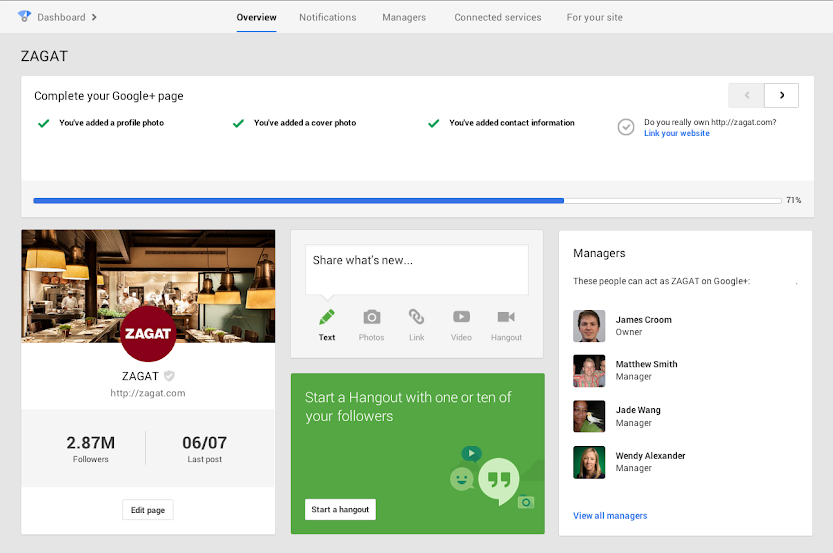
So, all of Google’s services are useful, even the ones I didn’t mention above, but why do you need a Google Plus Page? All you need to sign up to any Google service, after all, is a Gmail account. Well, it turns out that Google are so proud of their social network they want everyone to start using it, despite its lack of popularity when compared to the likes of Facebook. To persuade people to use Google Plus, the search giant released a special dashboard a couple of months ago. From this Google Plus dashboard, users can organise their business’ profile and settings on many Google services: they can change their company address on Google Maps, they can manage their YouTube channel and they can change their company’s search results on Google Search. Search is how Google made its name. It’s the most popular search engine online and it makes the most money of all the free-to-use websites. Maintaining an active presence on Google Plus, by setting up and managing a Page for your business, helps your company rank in Google Search – not just your Google Plus page, your website as well if you link the two together. Don’t get me wrong, Google Plus has a number of great features as well as the dashboard. On the service, you can post diverse content with interesting hashtags to drive conversation. You can follow, comment, +1 and interact, potentially gaining your company new clients and customers. You can find communities that are relevant to your business and connect with likeminded people. Best of all, you can use Hangouts to run video conferences. When Google last updated Plus, adding hashtags and changing the stream, I noted that, although the features improved the social network, people still wouldn’t flock to it. Google announced, last year, that400 million people were on Google Plus. In may this year, that figure went up to 500 million. At the time this seemed like a stretch. The reality was that 500 million people were signed into a Google service, be it Gmail, YouTube or docs, but they were not necessarily maintaining an active Google Plus account. For the reasons I have mentioned above, though, its still worth setting up a Google Plus business page. Don’t put as much effort into it as you would your Twitter, Facebook and LinkedIn accounts, but make sure it’s there so that when you need it (and, considering Google’s domination, you soon might) you can access it in a moment.

 The new Inner Circle feature is somewhat similar to Private Sharing, but involves more than just sharing posts. With Inner Circle, users can select a small subset of friends they wish to engage most closely with on a regular basis, according to Samanian. (For example, a user may choose to include only direct family members or a spouse in their Inner Circle.) Unlike Private Sharing, which is only relevant when sharing moments and posts, users can build their Inner Circle into all aspects of the app. They can share posts exclusively with them, filter their feed to only show posts from their Inner Circle friends, and even set up email and push notification alerts for posts from members of their Inner Circle.
Users choose people to include in their Inner Circle by selecting the star icon listed beside each friend's name on the friends list. Similar to the padlock icon used in Private Sharing, a post shared with a user's Inner Circle will have a star icon in the upper right-hand corner to denote its significance.
The new Inner Circle feature is somewhat similar to Private Sharing, but involves more than just sharing posts. With Inner Circle, users can select a small subset of friends they wish to engage most closely with on a regular basis, according to Samanian. (For example, a user may choose to include only direct family members or a spouse in their Inner Circle.) Unlike Private Sharing, which is only relevant when sharing moments and posts, users can build their Inner Circle into all aspects of the app. They can share posts exclusively with them, filter their feed to only show posts from their Inner Circle friends, and even set up email and push notification alerts for posts from members of their Inner Circle.
Users choose people to include in their Inner Circle by selecting the star icon listed beside each friend's name on the friends list. Similar to the padlock icon used in Private Sharing, a post shared with a user's Inner Circle will have a star icon in the upper right-hand corner to denote its significance.
 The Inner Circle feature is similar to how Google+ allows users to group their connections. However, Path only allows users to have one group, meaning you can't have one circle for family and another for colleagues like you can on Google+. Samanian said Path is not looking to add more circles at this time, and instead plans to "keep things simple."
In addition to the new sharing features, Path added one other update in an attempt to help with monetization: Path Premium. Path does not allow ads on its site, so it needs to find other ways to make money from its 20 million registered users. So far, the company's monetization strategy relies on users purchasing "sticker packs" and camera filters, which they can use to enhance their posts.
The premium package gives users unlimited access to items from the platform's online shop, plus early access to new items as they become available, Samanian said. The price for a year-long Path Premium membership is $14.99.
What do you think of Path's new features? Tell us in the comments, below.
The Inner Circle feature is similar to how Google+ allows users to group their connections. However, Path only allows users to have one group, meaning you can't have one circle for family and another for colleagues like you can on Google+. Samanian said Path is not looking to add more circles at this time, and instead plans to "keep things simple."
In addition to the new sharing features, Path added one other update in an attempt to help with monetization: Path Premium. Path does not allow ads on its site, so it needs to find other ways to make money from its 20 million registered users. So far, the company's monetization strategy relies on users purchasing "sticker packs" and camera filters, which they can use to enhance their posts.
The premium package gives users unlimited access to items from the platform's online shop, plus early access to new items as they become available, Samanian said. The price for a year-long Path Premium membership is $14.99.
What do you think of Path's new features? Tell us in the comments, below.